

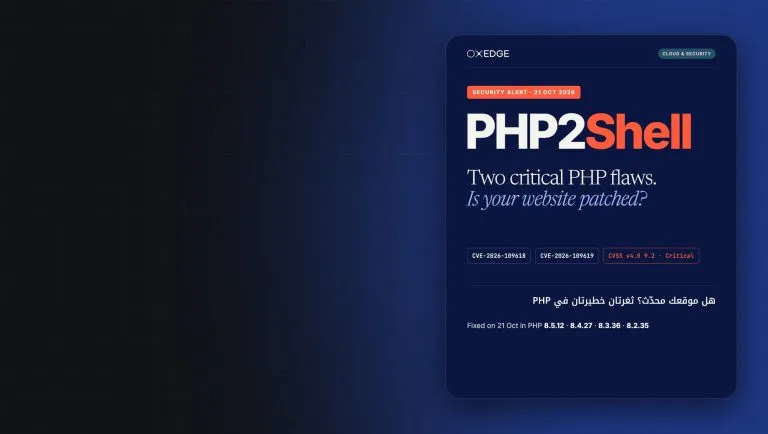
Quick answer: PHP2Shell is the name given to two critical PHP flaws, fixed on 21 October 2026, that can let an attacker run code on a web server without logging in. If your site runs on PHP, as every WordPress site does, ask your host today to move to PHP 8.5.12, 8.4.27, 8.3.36 or 8.2.35. On PHP 8.1 or older there’s no official fix.
On 21 October 2026 the PHP project told every PHP user to update immediately. Two flaws, nicknamed PHP2Shell, can allow an unauthenticated attacker to run their own code on the server behind a website. For a Dubai clinic, law firm or online store, that server holds the enquiry forms, customer accounts and admin logins. Most owners do not know which PHP version their site runs, or whether their host has patched it. This guide explains in plain language what PHP2Shell means for a UAE business website, how to check your version in a few minutes, what to ask your host or developer, and what to do if you are on PHP 8.1 or older.
Key takeaways
- Any website that runs on PHP and serves web requests is affected, whatever the hosting setup; the PHP project rates the risk highest for Apache with mod_php.
- The fix is an update to PHP 8.5.12, 8.4.27, 8.3.36 or 8.2.35, followed by a restart of every PHP worker.
- PHP 8.1 and older get no official update: ask for a vendor backport today and plan an upgrade.
- The PHP project says the interim settings only reduce exposure; updating is the only safe choice.
Sources: php.net news archive, 20 and 21 October 2026 · W3Techs, usage statistics of PHP, 22 October 2026 · php.net, unsupported branches · Help Net Security, 21 October 2026. Checked 22 October 2026.
What PHP2Shell is, in plain language
PHP is the programming language that runs a large share of the web. W3Techs counts it on 69.3 per cent of websites whose server-side language it can identify, and WordPress, which is built on PHP, powers 39.6 per cent of all websites. If your business site was built on WordPress or WooCommerce, or by a developer who used a PHP framework, the code that answers each visitor is PHP.
Sources: W3Techs, PHP usage · W3Techs, WordPress usage, both dated 22 October 2026
PHP2Shell is two bugs in PHP itself, not in a plugin or theme. CVE-2026-109618 sits in how PHP handles running out of memory; CVE-2026-109619 lets leftover data from one request leak into the next. Both can lead to remote code execution: an outsider running their own commands on your server.
The PHP project gave a day’s notice on 20 October and published the fix on 21 October, rating both flaws 9.2 out of 10 on CVSS v4.0. It says the risk is highest for Apache with mod_php, where a demonstrated exploit lets an unauthenticated request trigger the attack before any of your website’s own code runs. BleepingComputer reports the flaws were found by researchers from Calif, OpenAI and Wiz.
Sources: php.net, advance notice (20 October) and security advisory (21 October 2026) · BleepingComputer, 21 October 2026
Why this one is urgent
Attackers were moving before the patch. Help Net Security reports that Amazon’s MadPot honeypot recorded an exploitation attempt on 17 October 2026, four days before public disclosure, and BleepingComputer quotes Cloudflare as already seeing early attacks on the two flaws. Datadog Security Labs adds that the flaws work in default PHP configurations.
Sources: Help Net Security · BleepingComputer · Datadog Security Labs, 21 October 2026
A compromised website can quietly redirect visitors, steal what customers type into forms or send spam from your domain. Our article on how UAE businesses are actually being attacked shows how often the damage starts with one exposed system.
Is your website affected?
The PHP project’s answer is broad: all PHP installations serving web requests, including PHP-FPM, Apache with mod_php, php-cgi, FrankenPHP and LiteSpeed. The useful question for an owner is not “are we affected” but “who patches our server, and have they done it”.
| Your setup | Affected? | Who has to act |
|---|---|---|
| WordPress on shared hosting | Yes, if the host’s PHP is unpatched | The host updates PHP; you confirm the version and choose a fixed branch in the panel |
| Managed WordPress hosting | Yes, until the host rolls out the fix | The host; ask for written confirmation and the date it was applied |
| Own cloud server or VPS | Yes | Whoever manages the server: your developer, agency or IT team |
| Custom PHP or Laravel app | Yes | Your developer updates PHP, rebuilds any container images and restarts workers |
| Fully hosted site builder | Not your server to patch | The platform; check its status page if you are unsure what it runs on |
Source: php.net security advisory, 21 October 2026 (who is at risk)
How to check your PHP version in five minutes
You do not need to be technical. Try these in order.
- WordPress dashboard: go to Tools, then Site Health, then the Info tab, and open the Server section. It lists the PHP version the website is actually using.
- Hosting control panel: most panels, such as cPanel or Plesk, show the PHP version per domain, often under a PHP settings or version manager page.
- Ask your host or developer: request the exact PHP version serving your domain and whether the 21 October 2026 update is applied.
Two traps catch even experienced teams. Datadog notes that the command-line PHP version can differ from the runtime serving your website, and that Linux vendors may backport fixes without changing the version number. Ask whether the package includes the fixes for CVE-2026-109618 and CVE-2026-109619.
Source: Datadog Security Labs, PHP2Shell detection, analysis and remediation
The useful question for an owner is not “are we affected” but “who patches our server, and have they done it”.
Check where you stand
Pick the version you found and tick what applies. The tool runs in your browser and sends nothing anywhere.
Start with the WordPress Site Health screen or your hosting panel, or ask your host which PHP version serves your domain.
Fixed versions and how long each branch is supported
Each supported branch has one release that fixes both flaws, and you need that release or later. The last column shows when security fixes stop.
| Your branch | Fixed in | Security fixes until |
|---|---|---|
| PHP 8.5 | 8.5.12 | 31 December 2029 |
| PHP 8.4 | 8.4.27 | 31 December 2028 |
| PHP 8.3 | 8.3.36 | 31 December 2027 |
| PHP 8.2 | 8.2.35 | 31 December 2026 |
| PHP 8.1 | No official release; vendor backport or upgrade | Ended 31 December 2025 |
| PHP 8.0 and 7.4 | No official release; vendor backport or upgrade | Ended 26 November 2023 and 28 November 2022 |
Sources: php.net security advisory, 21 October 2026 · php.net, supported versions · php.net, unsupported branches. Checked 22 October 2026.
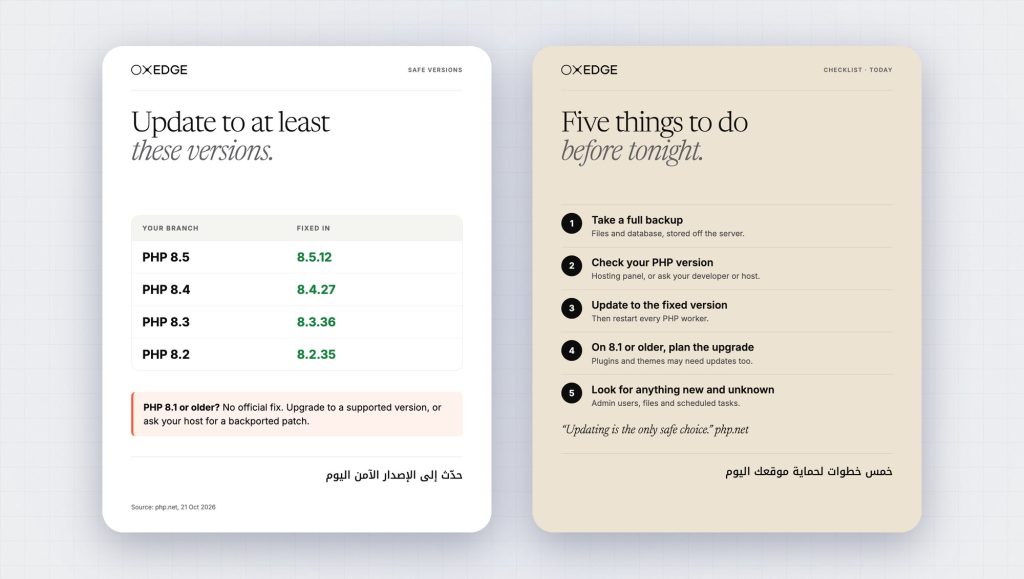
Note the PHP 8.2 row. The release notes for 8.2.35 repeat that PHP 8.2 reaches end of life on 31 December 2026, so a site patched to 8.2.35 today is safe from PHP2Shell but has about ten weeks of official security fixes left. We checked our own site first: oxedge.com runs PHP 8.2.35, the fixed release for its branch.
What to ask your host or developer today
A vague “is everything fine?” gets a vague “yes”. These questions get answers you can check.
- Which exact PHP version serves our website, and does it include the fixes for CVE-2026-109618 and CVE-2026-109619?
- When was the update applied, and were all PHP workers or the web server restarted afterwards?
- Does our server use Apache with mod_php, PHP-FPM or something else?
- Is there a recent backup of files and database stored away from the server, and has anyone tested restoring it?
- If we are on PHP 8.1 or older, what is the plan and the date for moving to a supported branch?
The restart question matters. Datadog’s guidance is to restart or replace every worker that still runs the old runtime, and to rebuild and redeploy container images. Installing an updated package while old PHP processes keep running leaves the old code in memory.
Source: Datadog Security Labs, remediation section
On PHP 8.1 or older: your real options
This is where many UAE business websites are stuck. A site built five or six years ago, never upgraded because “it still works”, is likely on PHP 7.4 or 8.0. W3Techs shows that 26.9 per cent of PHP websites still run PHP 7 and 7.7 per cent run PHP 5. Among PHP 8 sites, 15.2 per cent are on 8.1 and 5.8 per cent on 8.0. None of these branches gets an official fix.
Sources: W3Techs, PHP version breakdown · W3Techs, PHP 8 subversions, both dated 22 October 2026
A site built five or six years ago, never upgraded because “it still works”, is likely on PHP 7.4 or 8.0.
The PHP project says some distributions and LTS vendors provide backported fixes, and it published minimal source backports for PHP 7.4, 8.0 and 8.1 for people who build PHP themselves.
Source: php.net security advisory, 21 October 2026 (how to update)
| Option | What it means | Watch out for |
|---|---|---|
| Vendor backport | Your Linux distribution or an LTS vendor ships the fix for your old branch | Buys time only; the branch still misses every future fix |
| Upgrade to PHP 8.3 or newer | Move the site to a supported branch with years of fixes left | Old plugins, themes or custom code may break; test on a copy first |
| Take the site offline briefly | Show a holding page while the upgrade is done | Lost enquiries for a day or two, but no open door |
The last option sounds drastic, yet Help Net Security reports that the UK’s National Cyber Security Centre urged organisations to consider taking offline systems that cannot be fixed immediately. For a small brochure site, a short pause with a WhatsApp number on the holding page is often the cheaper risk.
Source: Help Net Security, 21 October 2026
The upgrade is usually less frightening than owners expect. Back up, clone the site to a staging copy, switch the copy to PHP 8.3 or newer, update plugins and themes, then test every page, form and checkout in English and Arabic. Where custom code fails, that is a job for a website development team.
How OXEDGE does this
We keep UAE business websites on supported, patched software with a written care routine.
- A version check of the live web runtime, recording the PHP branch, server mode and last restart.
- A fresh backup of files and database stored away from the server, and a test restore before any update.
- Updates on a staging copy first, then live, followed by a restart of every PHP worker and a check of forms, WhatsApp buttons and checkout in both languages.
- Monitoring for new admin accounts, changed files and downtime, plus a calendar of end-of-life dates.
If you cannot update today: interim steps for your developer
If a host needs a day, the PHP project lists measures that reduce exposure to specific attack paths, while stating they do not make an installation safe. Pass these to whoever manages the server.
- Set memory_limit to -1 in a way applications cannot override, such as php_admin_value in the FPM pool or Apache configuration.
- Set a low post_max_size: 8M for sites without file uploads, 32M where uploads are needed, with upload_max_filesize below it.
- Set session.upload_progress.enabled to 0 in php.ini or the pool configuration, not with ini_set(), and restart every worker.
- On PHP 8.5, set fatal_error_backtraces to 0 and restart every worker.
Source: php.net security advisory, “If you cannot update immediately”
If your site sits behind Cloudflare, Help Net Security reports initial firewall rules for known exploit routes on all plans, free included, and BleepingComputer quotes Cloudflare calling them temporary. Treat them as a seatbelt, not the fix.
Sources: Help Net Security · BleepingComputer
After patching: check nobody got in first
Because attacks were seen before the fix, a patched site is not proof of a clean site. A short review afterwards is good practice.
- List every admin and editor account and remove anyone you do not recognise, including former staff and agencies.
- Ask your developer to look for recently changed or unknown PHP files, particularly in upload folders.
- Check scheduled tasks on the server and in WordPress for anything nobody set up.
- Change admin, hosting and database passwords, and turn on two-factor sign-in wherever the panel offers it.
If anything looks wrong, restore from a backup taken before 17 October 2026 where you can, then patch before going live again. For a wider view of controls that limit damage when one system is hit, see our guide to zero trust for a small company. A serious incident, such as stolen customer data, is a matter for a cybersecurity specialist, not a quick plugin fix.
Questions UAE buyers ask
My website is on WordPress. Is WordPress itself the problem?
No. PHP2Shell is in PHP, the language WordPress runs on, so updating WordPress alone does not fix it. You need the PHP update on the server.
Our host says they handle security. Is that enough?
Ask for the exact PHP version and the date it was applied. On shared plans you often choose the PHP branch yourself, and an old branch chosen years ago may get no fix.
Does an SSL certificate or a security plugin protect us?
No. SSL encrypts traffic and a plugin runs inside PHP, after the point where the mod_php exploit can strike. Only the PHP update fixes the flaw.
We are on PHP 8.2.35. Are we done?
For PHP2Shell, yes, once workers have been restarted. But PHP 8.2 stops receiving security fixes on 31 December 2026, so plan the move to PHP 8.3 or newer before the end of the year.
You can see the kind of websites we build and look after in our portfolio.
Work with OXEDGE
Get a free PHP version check for your website before attackers check it for you.
We would confirm which PHP version actually serves your site, whether the PHP2Shell fix and a restart are in place, and what your host or developer still needs to do. You leave the first conversation with a short, written list of next steps, including an upgrade plan if you are on PHP 8.1 or older.
Get a free version checkExplore data and securityWhatsApp us